Geschäftszeiten").">
Set business hours - OrderHi Hilfe-Center
Geschäftszeiten")." />
Geschäftszeiten")." />
Skip to content
OrderHi Hilfe-Center
Set business hours
Deutsch
English
Tiếng Việt
Initializing search
Hilfe-Center
Katalog
Gastro Onlineshop
Kasse
Bookings
Kiosk
E-Invoicing
MCP
Partner API
Hardware
OrderHi Hilfe-Center
Hilfe-Center
Katalog
Katalog
Create categories
Create product menus and toppings
Create products
Create product types
Product markings
Product visibility
Gastro Onlineshop
Gastro Onlineshop
Accept orders
Set up advanced order times
Online shop discounts
Set holiday times
Activate online payments
Confirmation time buttons
Set business hours
Kasse
Kasse
Automated POS Discounts
Automated End-of-Day Closings
Attach a Hospitality Receipt (Bewirtungsbeleg)
Enable Black Printing on Receipts
Cart Product Options
Tap to Pay via OrderHi Connect App
Create a Reservation in the POS
DATEV Export
TSE TAR, DSFinV-K and GoBD Export
Set Up the Electronic Cash Drawer
E-Invoice Customization
External delivery platform integration
Set Up Fritz!Box Caller Identification
Divide Product Groups Across Different Printers
Interim Account/Technical Auxiliary Account for the Accounting Export
Reload the Catalog at the POS
POS Notification Obligation in Germany
Mark Open Invoices as Paid – Payment on Account
Bluetooth Printer Connection
Activate QR Code Ordering
Print Reduced Quantities on Processing/Kitchen Tickets
POS Remote Support / Getting Remote Access
Open Invoices with Online Orders via the Smart Pre-order System
Card Payments via SumUp
Connect SumUp Solo Lite to OrderHi POS
Connect SumUp Solo to the POS
SumUp Tap to Pay
Performing the End-of-Day Closing
Automatic Tip Payout for the Cash Book
TSE Certificates (Germany)
Download XRechnung/E-Invoice in XML/PDF Format
ZVT Card Reader End-of-Day Closing
Card Payments via the ZVT Interface for External Card Payment Terminals
Bookings
Bookings
Accepting Reservations
Calendar Mode
Calendar Export/Synchronization
Creating Services
Assigning Bookable Services to Staff (Restriction)
Setting Holiday Hours
Creating a Manual Reservation
Enabling Online Payments
Switching Table Pages
Kiosk
Kiosk
Customer order status QR code
Custom branding for OrderHi Kiosk
Kiosk dine-in and take-away settings
E-Invoicing
E-Invoicing
MCP
MCP
Einrichtung
Verfügbare Daten
Partner API
Partner API
Fehlertypen
Fehlertypen
Bad request
Unauthorized
Forbidden
Not found
Order already exists
Order not cancellable
Validation error
Rate limited
Internal error
Hardware
Hardware
Operating the Tablet
Connect Tablet
Mini POS Device
POS Device A1/A2/A3/A4
Kiosk K1/K2
Thermal Printer
Hilfe-Center
Gastro Onlineshop
Onlineshop
Set business hours
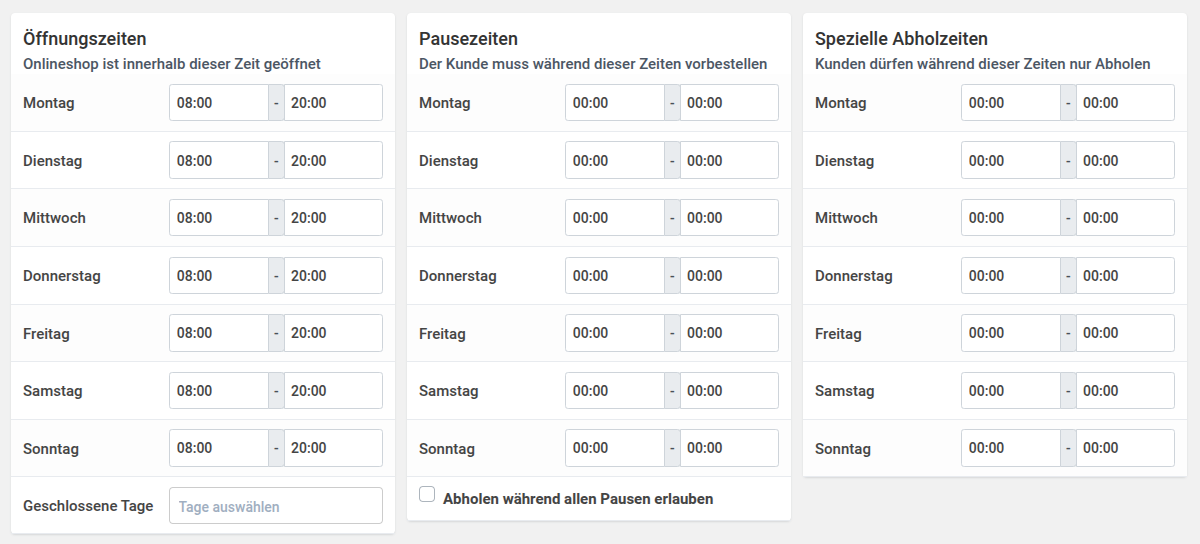
Go to
Company > Business hours
("Unternehmen > Geschäftszeiten").
Back to top