Product visibility
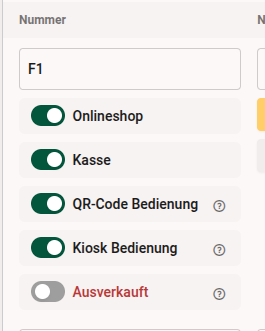
You can customize the visibility of your products in the business customer portal under Catalog > Products ("Katalog" > "Produkte"):
| Setting | Meaning |
|---|---|
| Online shop ("Onlineshop") | If enabled, the product is visible in the online shop |
| POS ("Kasse") | If enabled, the product is visible in the POS |
| QR code service ("QR-Code Bedienung") | If enabled, the product is visible in the POS QR code ordering system |
| Kiosk service ("Kiosk Bedienung") | If enabled, the product is visible in the self-checkout kiosk |
| Sold out ("Ausverkauft") | If enabled, the product is marked as sold out and cannot be ordered (online shop, QR code service, kiosk service). Within the POS, the product can still be ordered |