Card Payments via the ZVT Interface for External Card Payment Terminals
The ZVT interface for external card payment terminals. With this interface, you can connect external payment terminals to OrderHi POS to process card payments seamlessly.
Requirements
- A compatible ZVT-capable card payment terminal
- The card payment terminal must be connected to the same network as the OrderHi POS
- Active internet connection
Setup
Step 1: Register the terminal in the business customer portal
Business customer portal > POS > Payment methods > ZVT interface ("Geschäftskundenportal > Kasse > Zahlungsmethoden > ZVT-Schnittstelle")
Please read your terminal manufacturer's instructions to activate the ZVT interface and obtain, e.g., the IP address, port and password.
| Field | Meaning |
|---|---|
| Device name | Enter a unique name for the terminal |
| Payment method | Select the corresponding payment method or create a new label (used on invoices and reports) |
| IP address | Enter the local IP address of the terminal |
| Port | Enter the terminal's port (usually: 20007) |
| ZVT password | Enter the ZVT password configured on the terminal |
Step 2: Test at the POS
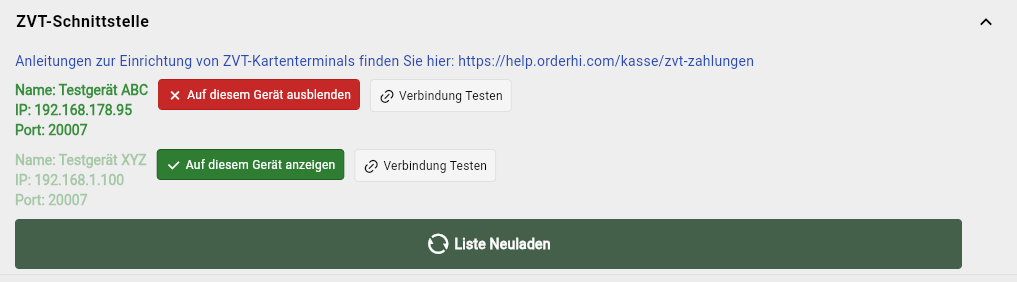
Settings > Payment terminals > ZVT interface ("Einstellungen > Zahlungsterminals > ZVT-Schnittstelle")
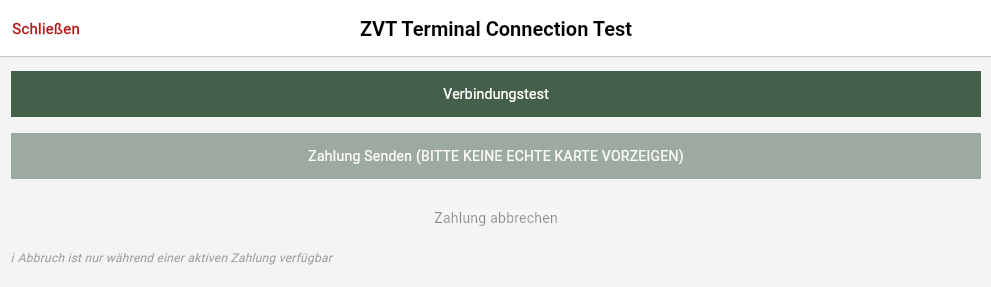
You should now find the terminal in the list. Tap Test connection ("Verbindung Testen"), then tap Connection test ("Verbindungstest") and check the connection.
!! IMPORTANT: Please do not test with a real card, as it will be charged !!
You should only check whether the payment can be sent to the terminal successfully.
Supported devices
| Model | Remarks |
|---|---|
| CCV Mobile Premium | Tested by customers |
| CCV Mobile A920 | Tested by customers |
| Ingenico Move 5000 | Tested by customers |
This list is currently being compiled, but in general most ZVT-capable terminals should work. However, some payment providers may have made their own customizations that prevent compatibility.
Do you have a ZVT-capable device and would like to help with the compatibility list? Feel free to contact us at [email protected] or through our support.
ZVT end-of-day closing
Depending on the card reader/payment provider, you must perform a ZVT end-of-day closing for each card reader at the end of the day. Please read the instructions in our ZVT card reader end-of-day closing document.